Godfeem: A Brush Handwriting Font for Creative Projects
When you’re searching for a typeface that brings personality and movement to your work, Godfeem offers a refreshing departure from standard digital fonts. This brush handwriting style captures the energy of hand-lettering while providing the convenience of a polished font file. Whether you design social media graphics, craft educational materials, or build personal projects, the unique character set and dual format support make Godfeem a practical tool for adding warmth and spontaneity.
Why a Brush Handwriting Font Stands Out
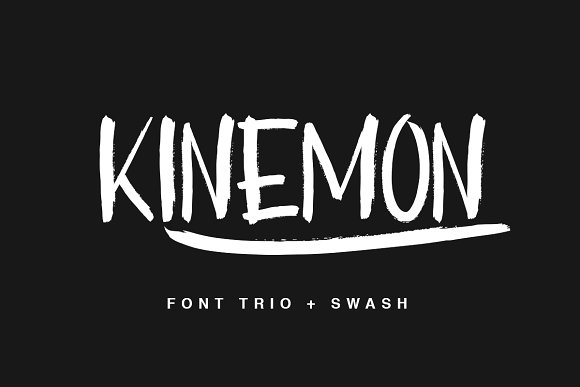
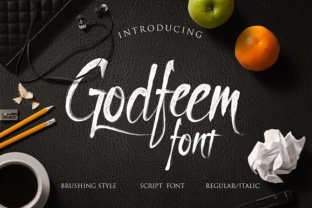
Brush handwriting fonts emulate the natural sweep and pressure of a real brush pen. Godfeem takes this approach with noticeably unusual letterforms—each glyph feels hand-drawn, with slight irregularities that give text an organic, approachable look. Unlike rigid sans-serif or traditional serif fonts, a brush style can instantly signal creativity and informality. For professionals who want to break away from corporate visual language, Godfeem provides an authentic handcrafted feel without requiring actual calligraphy skills. The result is content that feels more personal and less processed, which often leads to higher engagement in marketing and social media contexts.
Two Formats, Double the Flexibility
Practicality matters when choosing a font. Godfeem comes in both OTF and TTF formats, ensuring compatibility across different operating systems and design software. OpenType features include stylistic alternates and ligatures, while TrueType offers broad support for older applications. This dual-format approach saves you time troubleshooting compatibility issues and lets you focus on creative tasks. Additionally, the italic version is included alongside the regular weight—no need to hunt for a separate italic file. Having italic characters readily available means you can emphasize words, create contrast within a headline, or add a subtle slant to body text without distorting the original brush shapes.
Streamlined Workflow for Frequent Users
For freelancers and small business owners who juggle multiple projects, having the font in both formats reduces friction. You can install the TTF on a client’s computer or embed the OTF in a web project with minimal hurdles. The italic characters are particularly useful when designing quotes, subheadings, or call-to-action buttons that need a touch of rhythm. Instead of manually slanting text, which can warp the brush aesthetic, built-in italics preserve the intended stroke dynamics.
Who Benefits Most from Godfeem
The font serves a broad range of users, but certain groups will find its quirks especially valuable.
- Marketers and Social Media Managers – Eye-catching headlines for Instagram stories, Facebook ads, or blog headers benefit from Godfeem’s playful character shapes. It pairs well with clean backgrounds, making text pop without aggressive styling.
- Educators and Content Creators – Worksheets, presentation decks, and online course materials gain a friendly, handwritten tone. Students often respond better to materials that feel less formal, and Godfeem’s legibility at medium sizes supports both reading and comprehension.
- Hobbyists and DIY Enthusiasts – Birthday invitations, custom planners, or hobby blogs become more distinctive. The font’s unique character forms encourage experimentation; you can combine them with simple illustrations or photos to create cohesive visual stories.
- Publishers and Zine Makers – Short-run publications, newsletters, or zines that aim for an artisanal feel. Godfeem works particularly well for titles, pull quotes, and accent text, while body copy may remain in a more neutral font for readability.
Practical Use Cases That Showcase the Font’s Strengths
Imagine you’re designing a promotional flyer for a weekend workshop. Using Godfeem for the event title immediately communicates that the session is hands-on and creative, not a lecture. Pair it with a simple sans-serif for logistical details—date, time, location—to maintain clarity. The italic version can highlight the workshop’s theme or a discount code, drawing the eye without overwhelming the layout.
Another realistic scenario: you run a small online store selling handmade goods. Instead of generic product titles, applying Godfeem to item names reinforces your brand’s craft-centric identity. Even if customers don’t consciously notice the font, they absorb the handmade vibe that the brush strokes subtly convey. Over time, this can strengthen brand recognition and customer trust.
Thoughtful Considerations Before Using Godfeem
No font is perfect for every situation. Godfeem’s brush handwriting style shines in display contexts—larger sizes (24 pt and above) where its unique letterforms remain clear and expressive. At very small sizes or long passages of body text, the irregular stroke weights may reduce readability. For professional documents like reports or formal proposals, consider using a more neutral font and reserving Godfeem for headings, logos, or decorative elements.
Additionally, while the italic characters are a welcome inclusion, they are designed to complement the regular set—not to replace a full italic family. For projects that require extensive italic text across multiple weights, you may want to compare Godfeem with other brush fonts that offer more robust weight ranges. Testing the font in your actual software environment is always recommended before committing to a large project.
How Godfeem Supports Creative and Professional Goals
At its core, Godfeem helps you communicate a tone that standard fonts cannot. If your goal is to evoke spontaneity, warmth, or individuality, this typeface delivers those qualities efficiently. It simplifies the decision-making process: instead of scanning hundreds of premium fonts, you can download Godfeem and start prototyping immediately. The OTF and TTF formats mean less time troubleshooting technical glitches, and the pre-built italic characters reduce the need for manual adjustments.
For creators who value authenticity in their output, Godfeem’s brush-like imperfections work as a stylistic asset. They imply a human touch, which can make digital content feel more relatable. This psychological effect matters whether you’re a blogger trying to build a loyal readership or an entrepreneur launching a product line that prioritizes craftsmanship. While no font alone guarantees success, choosing the right visual language—one that matches your message—can significantly improve how your audience perceives your work.
Final Observations on Fit and Versatility
Godfeem occupies a sweet spot between ready-to-use convenience and handcrafted character. Its dual format support and italic variant address common practical needs, so you can focus on what the font enables you to create rather than on installation issues. The typeface is best leveraged in contexts where its playful, brush-driven shapes enhance rather than distract. Use it to energize headers, tilt quotations, or accent design elements that need a dash of personality.
For those who love to experiment with fun projects, Godfeem offers a reliable starting point. Its unique characters invite exploration—try combining different sizes, colors, and background textures to see how the brush strokes interact. Over time, you’ll develop an intuitive sense of where the font fits best. Whether you’re a seasoned designer or a curious hobbyist, Godfeem provides a meaningful option for adding a handmade aesthetic to your digital toolkit.