Waterbug: A Handwritten Font with Elegant Swashes
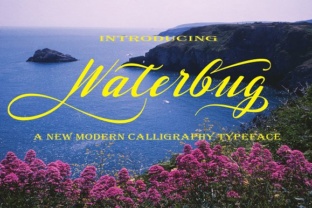
Finding a handwritten font that feels both organic and polished can be a challenge. Many script fonts lean too far into casual scribbling or overly rigid calligraphy, leaving little room for the spontaneous charm that makes hand lettering so appealing. Waterbug, created by designer Danti, strikes a rare balance. It is a stunning handwritten font that pairs natural movement with beautifully crafted swashes, and those swashes are accessible directly within any application. This means you can add flourishes, tails, and decorative touches without digging through alternate character maps or installing extra software. For designers, marketers, and content creators, Waterbug opens up a range of creative possibilities that feel both refined and approachable.
What Makes Waterbug Stand Out
At its core, Waterbug captures the essence of real handwriting. The letters are fluid and slightly irregular, echoing the way ink flows from a pen on paper. What elevates it beyond a simple script is the integrated swash system. Every uppercase character includes a flourish that extends naturally from the letterform, and many lowercase letters offer initial or terminal swashes. In any application that supports OpenType features—such as Adobe Illustrator, Photoshop, Canva, or Microsoft Word—you can toggle these swashes on and off with a single click. This eliminates the tedious process of copy-pasting glyphs, making Waterbug a practical choice for both quick drafts and polished final designs.
The font includes stylistic alternates, ligatures, and contextual swashes that adjust based on letter combinations. This means the swashes are not just decorative extras; they are woven into the font’s behavior. When you type a word, the swashes may automatically connect in a way that mimics natural calligraphy, giving your text a cohesive, handcrafted look. For anyone who wants the feel of custom lettering without commissioning a handwritten piece, Waterbug offers a reliable shortcut.
Creative Applications for Waterbug
Because Waterbug balances elegance with readability, it works well across a variety of media. Below are some of the most effective ways to use it, each suited to different creative goals.
Invitations and Event Stationery
Waterbug’s swashes lend themselves beautifully to formal and semi-formal invitations. For weddings, anniversaries, or galas, you can set the main headline—such as “Join Us” or the couple’s names—in Waterbug with full swashes, then pair it with a clean sans-serif for details like dates and locations. The font’s natural rhythm prevents the text from feeling stiff, while the swashes add a touch of luxury. Try using the swashes on the first letter of the invitee’s name for a personalized detail.
Branding and Logo Design
Small business owners and freelancers often seek a logo that feels approachable yet professional. Waterbug can serve as a primary logotype for brands in wellness, floristry, boutique retail, or creative services. The swashes can be used as decorative elements—for example, extending the tail of a “g” or “y” to underline the brand name. Because the font supports stylistic alternates, you can experiment with different swash combinations until you find a signature look that remains consistent across business cards, website headers, and packaging.
Social Media Graphics and Quotes
Instagram, Pinterest, and other visual platforms thrive on typography that stands out. Waterbug is ideal for quote cards, motivational posts, and announcements. The swashes draw the eye without overwhelming the message. For a cohesive feed, use Waterbug for the main quote and a minimal sans-serif for the attribution or hashtags. The font also works well in stories where you want a handwritten feel but need the text to remain legible at small sizes. Keep the swashes on for headlines; you can turn them off for longer captions to maintain clarity.
Product Labels and Packaging
Handwritten fonts often appear on artisanal products, from candles and soaps to coffee and tea. Waterbug’s swashes can mimic the look of hand-lettered ingredient lists or brand stories. Because the font is available in standard formats, you can embed it in label templates or use it with design software that outputs print-ready files. The natural variation in letterforms adds a handmade quality that resonates with customers looking for authenticity.
How Different Users Can Adapt Waterbug
The flexibility of Waterbug means it can be tailored to various audiences and contexts. Here is how different professionals might approach it.
- Graphic designers can use Waterbug for packaging prototypes, editorial headers, or custom monograms. The swashes allow quick iteration without redrawing flourishes manually.
- Bloggers and content creators can apply it to featured images, blog headers, or email newsletters. A consistent font choice helps build brand recognition.
- Educators and hobbyists can incorporate Waterbug into worksheets, classroom posters, or personal projects like scrapbooking. Its readability ensures that the text remains accessible even when decorative.
- Marketers and entrepreneurs may find Waterbug useful for landing page headlines or promotional banners. The combination of handwriting and swash details can convey a brand’s creative side without sacrificing professionalism.
When adapting Waterbug, consider the platform. On digital screens, swashes can become compressed at small sizes, so avoid using them for body text or fine print. For print, test the font at the actual output size to ensure the swashes do not take up too much space. Thinner paper may cause ink bleed that muddles delicate details, so adjust stroke weight or spacing accordingly.
Practical Tips for Using Waterbug Effectively
To get the most out of Waterbug, apply these strategies to keep your designs clear and audience-friendly.
- Control swash frequency. While the font makes swashes easy to enable, using them on every letter can clutter the design. Reserve full swashes for initials or short headlines. For longer phrases, use contextual alternates that moderate the flourish intensity.
- Pair with a neutral font. Waterbug works best when supported by a clean sans-serif (like Lato, Montserrat, or Open Sans) or a classic serif (like Playfair Display). This contrast gives the handwritten elements room to breathe.
- Maintain line spacing. Because swashes extend beyond the letter boundaries, increase line height to prevent overlapping. In design software, set leading to at least 1.4–1.6 times the font size.
- Check legibility at small sizes. Waterbug retains legibility down to about 14pt for digital use, but below that the swashes may become indistinct. For footnotes or metadata, consider a complementary sans-serif.
- Use color strategically. A single bold color for the swashed text keeps the design cohesive. Avoid placing it over busy backgrounds; a soft gradient or solid color block helps the swashes stand out.
Real-World Project Ideas
If you are looking for a concrete starting point, here are three projects that demonstrate Waterbug’s versatility.
1. Wedding Stationery Suite
Create a matching invitation, RSVP card, and thank-you note. Use Waterbug for the couple’s names and “together with their families” line. For the rest of the text, use a simple serif. Enable swashes on the first ‘T’ of “Together” and the first ‘J’ of “Join.” Print on textured cardstock to mimic real watercolor paper.
2. Coffee Brand Logo and Labels
Design a logo for a small-batch coffee roaster. Set the brand name in Waterbug with an elongated swash on the last letter. For bag labels, use the font for the blend name (e.g., “Morning Blend”) and a sans-serif for ingredients and origin notes. The handwriting effect suggests artisan craftsmanship.
3. Personal Quote Poster
Select a short motivational quote (10–15 words). Type it in Waterbug with swashes active. Add a subtle shadow or outline to the text. Pair with a minimalist geometric background. This project works well for a home office wall or an Instagram post.
Keeping Results Organized and Consistent
When using Waterbug across multiple pieces, consistency is key. Save a document that defines your preferred swash settings, font size, and pairing font. For branding guidelines, note which swash alternates you choose for specific letters—this ensures the same flourishes appear on your website and your invoice template. If you are working with a team, share a graphic style guide that includes Waterbug’s license information and installation instructions. Since the font is by Danti, verify that your usage complies with the license (commercial versus personal).
Also, consider the emotional tone of the swashes. Larger, more elaborate flourishes feel festive or luxurious, while minimal swashes appear modern and understated. Match the level of ornamentation to the audience. A children’s event invitation might benefit from playful, varied swashes, while a law office’s branding would require restrained use. Always prioritize the message over decoration; the font should enhance, not overshadow.
Final Thoughts
Waterbug is more than a pretty script. It is a tool that brings the warmth of handwritten communication into digital designs without compromising on quality or convenience. The accessible swashes remove technical barriers, allowing designers and non-designers alike to add flourishes that once required hours of manual work. Whether you are crafting a wedding invitation, building a brand identity, or simply refreshing your social media aesthetic, Waterbug offers a graceful, adaptable solution. Experiment with its features, pair it thoughtfully, and let the natural flow of the letters guide your creative direction. The result will be work that feels personal, polished, and genuinely engaging.